Advent of Cyber 2025 - Day 7 - Scan-ta Clause
Day 7 of Advent of Cyber 2025 covering network discovery and port scanning with Nmap, uncovering hidden services on non-standard ports, and using multiple protocols to discover keys and regain access to a compromised server.

Description
Christmas preparations are delayed - HopSec has breached our QA environment and locked us out! Without it, the TBFC projects can’t be tested, and our entire SOC-mas pipeline is frozen. To make things worse, the server is slowly transforming into a twisted EAST-mas node.
Can you uncover HopSec’s trail, find a way back into tbfc-devqa01, and restore the server before the bunny’s takeover is complete? For this task, you’ll need to check every place to hide, every opened port that bunnies left unprotected. Good luck!
Learning Objectives:
- Learn the basics of network service discovery with Nmap
- Learn core network protocols and concepts along the way
- Apply your knowledge to find a way back into the server
Introduction
This is the seventh challenge in this year’s Advent of Cyber hosted by TryHackMe, a 24 day cyber security challenge where new objectives are released every day. Each objective consists of multiple questions and flags we must find on their machines, sometimes by simply following their instructions and other times by needing to find something hidden ourselves. This challenge focuses on network discovery and port scanning using Nmap. The TBFC QA server (tbfc-devqa01) has been compromised by HopSec, and we need to scan for open ports, discover hidden services, and find three keys to regain access to the admin panel. We’ll be using various scanning techniques to uncover services running on non-standard ports and using different protocols (TCP and UDP) to complete our investigation.
Solving the challenge
To begin we will run an nmap scan against the machine. The challenge recommend running a simple scan but I will be running nmap -sV -sC -p- 10.66.148.103 to get a better picture of everything running on it. Unlike a basic nmap scan this one will also check for versions thanks to -sV and run the default nmap scripts thanks to -sC, which we will need for banner grabbing later on in the challenge anyways. The nmap output can be seen below:
1
2
3
4
5
6
7
8
9
10
11
12
13
14
15
16
17
18
19
20
21
22
23
24
25
26
27
28
29
30
31
32
33
34
35
36
37
38
39
40
41
42
43
44
45
46
47
48
49
50
51
52
53
54
55
56
57
58
59
60
61
62
63
64
65
66
67
68
69
70
71
72
73
74
75
76
77
78
79
80
81
82
83
84
85
86
87
88
89
90
91
92
93
94
95
96
97
root@ip-10-66-113-27:~# nmap -sV -sC -p- 10.66.148.103
Starting Nmap 7.80 ( https://nmap.org ) at 2025-12-17 20:44 GMT
mass_dns: warning: Unable to open /etc/resolv.conf. Try using --system-dns or specify valid servers with --dns-servers
mass_dns: warning: Unable to determine any DNS servers. Reverse DNS is disabled. Try using --system-dns or specify valid servers with --dns-servers
Nmap scan report for 10.66.148.103
Host is up (0.00023s latency).
Not shown: 65531 filtered ports
PORT      STATE SERVICE VERSION
22/tcp    open  ssh     OpenSSH 9.6p1 Ubuntu 3ubuntu13.14 (Ubuntu Linux; protocol 2.0)
80/tcp    open  http    nginx
|_http-title: TBFC QA \xE2\x80\x94 EAST-mas
21212/tcp open  ftp     vsftpd 3.0.5
| ftp-anon: Anonymous FTP login allowed (FTP code 230)
|_Can't get directory listing: TIMEOUT
| ftp-syst:
|   STAT:
| FTP server status:
|      Connected to 10.66.113.27
|      Logged in as ftp
|      TYPE: ASCII
|      No session bandwidth limit
|      Session timeout in seconds is 300
|      Control connection is plain text
|      Data connections will be plain text
|      At session startup, client count was 4
|      vsFTPd 3.0.5 - secure, fast, stable
|_End of status
25251/tcp open  unknown
| fingerprint-strings:
|   DNSStatusRequestTCP, DNSVersionBindReqTCP, LDAPBindReq, NULL, RPCCheck, SMBProgNeg, X11Probe:
|     TBFC maintd v0.2
|     Type HELP for commands.
|   FourOhFourRequest, GenericLines, GetRequest, HTTPOptions, LDAPSearchReq, RTSPRequest:
|     TBFC maintd v0.2
|     Type HELP for commands.
|     unknown command
|     unknown command
|   Help:
|     TBFC maintd v0.2
|     Type HELP for commands.
|     Commands: HELP, STATUS, GET KEY, QUIT
|   Kerberos, LPDString, SSLSessionReq, TLSSessionReq, TerminalServerCookie:
|     TBFC maintd v0.2
|     Type HELP for commands.
|     unknown command
|   SIPOptions:
|     TBFC maintd v0.2
|     Type HELP for commands.
|     unknown command
|     unknown command
|     unknown command
|     unknown command
|     unknown command
|     unknown command
|     unknown command
|     unknown command
|     unknown command
|     unknown command
|_    unknown command
1 service unrecognized despite returning data. If you know the service/version, please submit the following fingerprint at https://nmap.org/cgi-bin/submit.cgi?new-service :
SF-Port25251-TCP:V=7.80%I=7%D=12/17%Time=694316B1%P=x86_64-pc-linux-gnu%r(
SF:NULL,29,"TBFC\x20maintd\x20v0\.2\nType\x20HELP\x20for\x20commands\.\n")
SF:%r(GenericLines,49,"TBFC\x20maintd\x20v0\.2\nType\x20HELP\x20for\x20com
SF:mands\.\nunknown\x20command\nunknown\x20command\n")%r(GetRequest,49,"TB
SF:FC\x20maintd\x20v0\.2\nType\x20HELP\x20for\x20commands\.\nunknown\x20co
SF:mmand\nunknown\x20command\n")%r(HTTPOptions,49,"TBFC\x20maintd\x20v0\.2
SF:\nType\x20HELP\x20for\x20commands\.\nunknown\x20command\nunknown\x20com
SF:mand\n")%r(RTSPRequest,49,"TBFC\x20maintd\x20v0\.2\nType\x20HELP\x20for
SF:\x20commands\.\nunknown\x20command\nunknown\x20command\n")%r(RPCCheck,2
SF:9,"TBFC\x20maintd\x20v0\.2\nType\x20HELP\x20for\x20commands\.\n")%r(DNS
SF:VersionBindReqTCP,29,"TBFC\x20maintd\x20v0\.2\nType\x20HELP\x20for\x20c
SF:ommands\.\n")%r(DNSStatusRequestTCP,29,"TBFC\x20maintd\x20v0\.2\nType\x
SF:20HELP\x20for\x20commands\.\n")%r(Help,4F,"TBFC\x20maintd\x20v0\.2\nTyp
SF:e\x20HELP\x20for\x20commands\.\nCommands:\x20HELP,\x20STATUS,\x20GET\x2
SF:0KEY,\x20QUIT\n")%r(SSLSessionReq,39,"TBFC\x20maintd\x20v0\.2\nType\x20
SF:HELP\x20for\x20commands\.\nunknown\x20command\n")%r(TerminalServerCooki
SF:e,39,"TBFC\x20maintd\x20v0\.2\nType\x20HELP\x20for\x20commands\.\nunkno
SF:wn\x20command\n")%r(TLSSessionReq,39,"TBFC\x20maintd\x20v0\.2\nType\x20
SF:HELP\x20for\x20commands\.\nunknown\x20command\n")%r(Kerberos,39,"TBFC\x
SF:20maintd\x20v0\.2\nType\x20HELP\x20for\x20commands\.\nunknown\x20comman
SF:d\n")%r(SMBProgNeg,29,"TBFC\x20maintd\x20v0\.2\nType\x20HELP\x20for\x20
SF:commands\.\n")%r(X11Probe,29,"TBFC\x20maintd\x20v0\.2\nType\x20HELP\x20
SF:for\x20commands\.\n")%r(FourOhFourRequest,49,"TBFC\x20maintd\x20v0\.2\n
SF:Type\x20HELP\x20for\x20commands\.\nunknown\x20command\nunknown\x20comma
SF:nd\n")%r(LPDString,39,"TBFC\x20maintd\x20v0\.2\nType\x20HELP\x20for\x20
SF:commands\.\nunknown\x20command\n")%r(LDAPSearchReq,49,"TBFC\x20maintd\x
SF:20v0\.2\nType\x20HELP\x20for\x20commands\.\nunknown\x20command\nunknown
SF:\x20command\n")%r(LDAPBindReq,29,"TBFC\x20maintd\x20v0\.2\nType\x20HELP
SF:\x20for\x20commands\.\n")%r(SIPOptions,D9,"TBFC\x20maintd\x20v0\.2\nTyp
SF:e\x20HELP\x20for\x20commands\.\nunknown\x20command\nunknown\x20command\
SF:nunknown\x20command\nunknown\x20command\nunknown\x20command\nunknown\x2
SF:0command\nunknown\x20command\nunknown\x20command\nunknown\x20command\nu
SF:nknown\x20command\nunknown\x20command\n");
Service Info: OSs: Linux, Unix; CPE: cpe:/o:linux:linux_kernel

Service detection performed. Please report any incorrect results at https://nmap.org/submit/ .
Nmap done: 1 IP address (1 host up) scanned in 293.28 seconds
The output shows us 4 interesting ports:
- SSH running on port 22
- HTTP running on port 80
- FTP running on port 21212 with anonymous login allowed
- a custom service running on port 25251 with a GET KEY command
What evil message do you see on top of the website?
We know there is a website running on the machine thanks to the nmap output, so we just need to visit it in our web browser
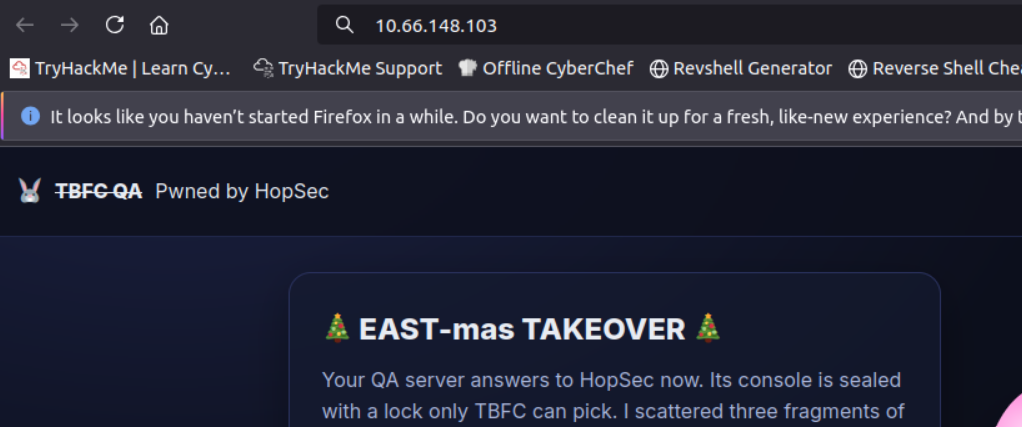
Answer: Pwned by HopSec
What is the first key part found on the FTP server?
As seen in the nmap output the FTP service allows for anonymous login, so we can connect to it with the command ftp 10.66.148.103 21212 and entering the username anonymous when prompted. After successfully connecting I ran the ls command and saw that the file with the key was right there, so I retrieved it with get tbfc_qa_key1 -, using - to print directly to the console without saving the file.
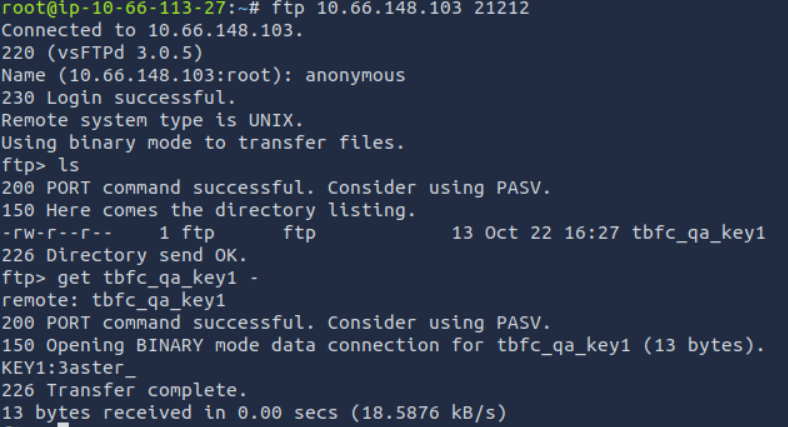
Answer: 3aster_
What is the second key part found in the TBFC app?
To find this we need to connect to the custom service we found running on port 25251 using netcat, with the command nc 10.66.148.103 25251. From the nmap output we already saw that GET KEY was one of the available commands, so we can just use that to find the next key.
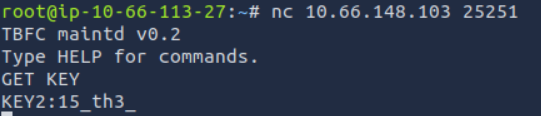
Answer: 15th3
What is the third key part found in the DNS records?
For this question we need to query a DNS server, however these usually use UDP. Since we only ran a TCP scan we now need to run a UDP scan with the command sudo nmap -sU 10.66.148.103. The output of the scan shows us there is a domain service on port 53 which we can query with dig, a command used for interacting with DNS servers. We know from the challenge text that the domain name we are looking for is key3.tbfc.local, so we can use the command dig @10.66.148.103 TXT key3.tbfc.local +short to find the key. This command queries the DNS server at 10.66.148.103 (@10.66.148.103) for TXT records (TXT) associated with the domain key3.tbfc.local, and displays only the short answer (+short) without verbose output.

Answer: n3w_xm45
Which port was the MySQL database running on?
There was no MySQL service visible in the output of our nmap scan, which means it’s likely listening only on localhost (127.0.0.1) rather than on all network interfaces (0.0.0.0). Services bound to localhost can only be accessed from the machine itself, not remotely, which is why our external port scan didn’t detect it. To investigate further, we first need to gain access to the server by visiting the website and accessing the admin panel using the combined key we found: 3aster_15_th3_n3w_xm45. After doing so we are greeted with a button that says Go to Terminal, giving us a console on the local host.
With access to the local host we can run the command ss -tunlp which shows information about network sockets, active connections and listening ports on a system.
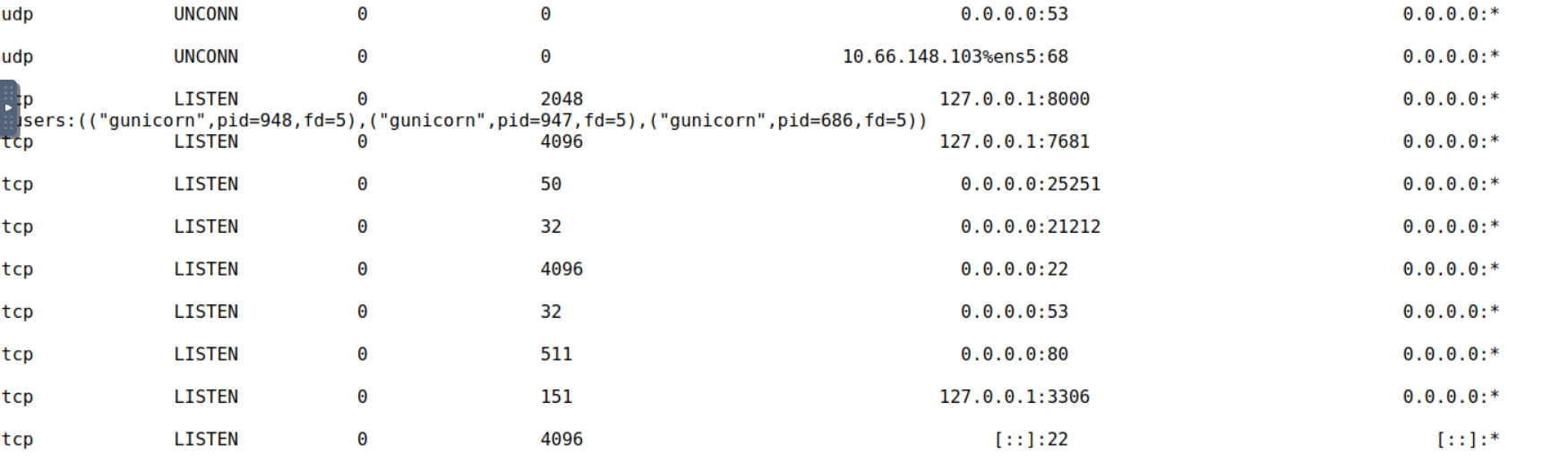
In the output we see all the services we found in our nmap scans shown as running on the ip 0.0.0.0, as well as some services running only on the local host shown by the ip 127.0.0.1. The one that stands out in particular is the one running on port 3306, which is the default port for MySQL.
Answer: 3306
Finally, what’s the flag you found in the database?
Now that we know MySQL is running on the machine we can find the database names with the command mysql -e "show databases;". Doing so returns 3 databases, the interesting one being tbfcqa01. We can look at the tables in that database with the command mysql -D tbfcqa01 -e "show tables;", which reveals that there is a table named flags. Finally, we can view all the contents in that table with the command mysql -D tbfcqa01 -e "select * from flags;".
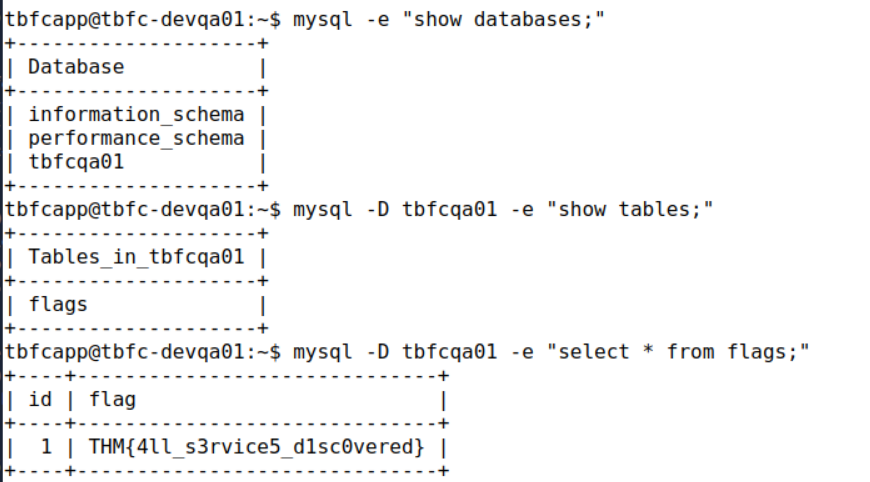
Answer: THM{4ll_s3rvice5_d1sc0vered}