Holiday Hack Challenge 2025 - Spare Key
A cloud security audit challenge discovering exposed Terraform configuration files containing long-lived SAS tokens with full permissions in an Azure static website storage account.
Solving the challenge
As with other Act one challenges we are given a bit of a walk through on how to go about solving the challenge. When we first connect we are told “Let’s start by listing all resource groups $ az group list -o table This will show all resource groups in a readable table format.”
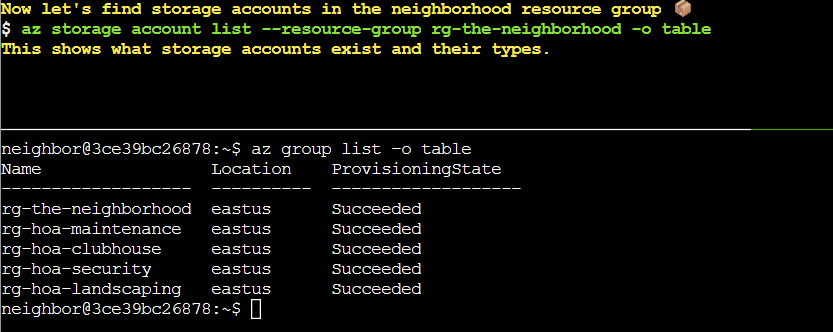
This showed us the 5 resource groups available in this tenant. We are then asked to find the storage accounts with the command az storage account list --resource-group rg-the-neighborhood -o table

Next we are told to search for a static website with the command az storage blob service-properties show --account-name <insert_account_name> --auth-mode login. neighborhoodhoa appeared to be the main HOA website account based on its naming, so I ran the command az storage blob service-properties show --account-name neighborhoodhoa --auth-mode login.

It worked! neighborhoodhoa does in fact have a static website set up. Now we need to see what containers exist in the account so I ran the command az storage container list --account-name neighborhoodhoa --auth-mode login -o table

Two containers were found:
$webwith “None” public access (requires authentication to list contents)publicwith “Blob” public access (publicly readable if you know the blob name)
The “$web” container stood out as it hosts the static website, so I checked its contents with az storage blob list --account-name neighborhoodhoa --container-name '$web' --auth-mode login -o table

The last file on the list ‘iac/terraform.tfvars’ is a Terraform infrastructure configuration file that should not be publicly accessible on a static website and likely contains the key we’re looking for. Taking a look into it with az storage blob download --account-name neighborhoodhoa --container-name '$web' --name iac/terraform.tfvars --file /dev/stdout --auth-mode login I found what was wrong.
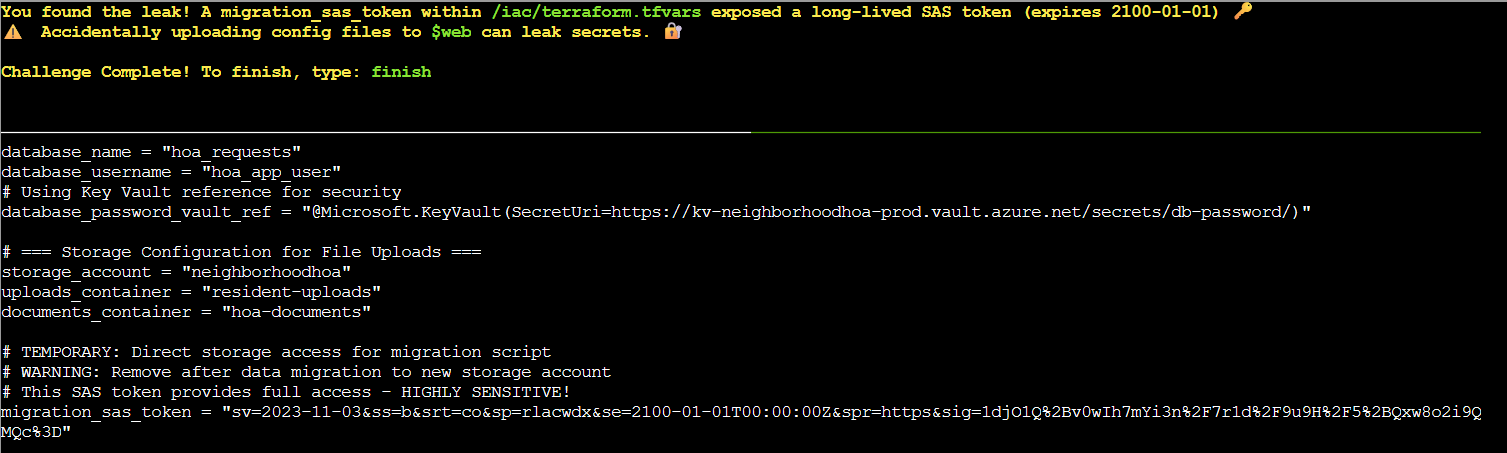
As seen in the screenshot above, the terraform config file contained a long-lived SAS (Shared Access Signature) token with full permissions (rlacwdx: read, list, add, create, write, delete, execute) that doesn’t expire until 2100-01-01. While the $web container itself had ‘None’ public access, having this file in the static website directory structure meant it could be discovered and accessed by anyone with authenticated access to the storage account, or potentially through the static website URL path. This represents a critical security vulnerability as the SAS token grants extensive access to storage resources.
Now we just need to run finish to complete the challenge.